How to Change the Shutter Sound on a Samsung Camera
Quick Answer
Open Home > Basic > Settings > Sound > Shutter Sound, then select a documented option. The selected shutter-sound option is applied.
Manual Illustration
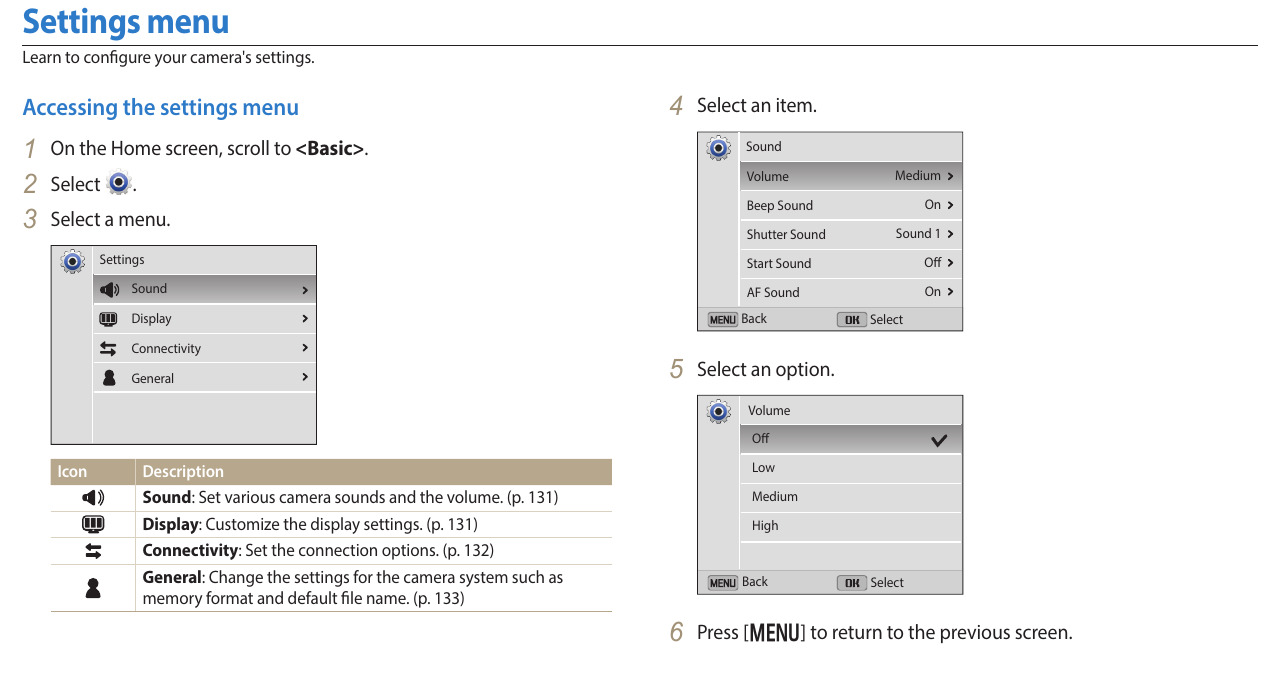
Steps
1. Open Settings from the Basic group on the Home screen
In Camera Home screen > Basic, open Settings. The Settings menu appears.
2. Select Sound
In Settings menu, select Sound. The Sound settings appear.
3. Select Shutter Sound
Select Shutter Sound. The available shutter-sound options appear.
4. Select Off, Sound 1, Sound 2, or Sound 3
In the open Shutter Sound menu, select a documented option. The selected Shutter Sound option is applied.
Available Options
- Off.
- Sound 1.
- Sound 2.
- Sound 3.
Model Notes
- Samsung DV Series
- Samsung ST Series
- Samsung WB Series
- Common validated models: DV150F, DV300, ST150F, ST200, ST201
Frequently Asked Questions
Does turning off Shutter Sound also disable button beeps?
No. Beep Sound is listed as a separate setting in the Sound menu.
Source Information
This independent help article is based on executable procedures extracted from Samsung user manuals for the supported models. It is not an official Samsung support page. Menu and control illustrations are based on the same Samsung user-manual documentation.