How to Use a Coway Air Purifier: Airmega 250/250S Setup, Modes & Filter Reset Guide
Using a Coway air purifier is easy once you understand the setup, buttons, modes, indicator lights, and filter reset process. This guide is based on the Coway Airmega 250 and Airmega 250S user manual.
The most important first-use step is removing the plastic wrapping from the Max2 filter. After preparing the filter, plug the purifier into the correct outlet, press Power, and use Smart mode for normal daily operation.
1. Know the Main Parts
The Coway Airmega 250/250S has a front cover, control panel, air quality indicator, air outlet cover, side handles, and power cord. The control panel is on the top and includes the Power, Mode, Speed, Light, Filter reset, and model-specific buttons. On the Airmega 250S, the extra button is Wi-Fi. On the Airmega 250, it is Timer.
Place the air purifier on a firm, flat, dry surface with open space around the intake and outlet. Do not block the sides or air outlet. Avoid bathrooms, laundry rooms, wet outlets, direct sunlight, curtains, bedding, and flammable materials.
2. Remove the Max2 Filter Plastic Before First Use
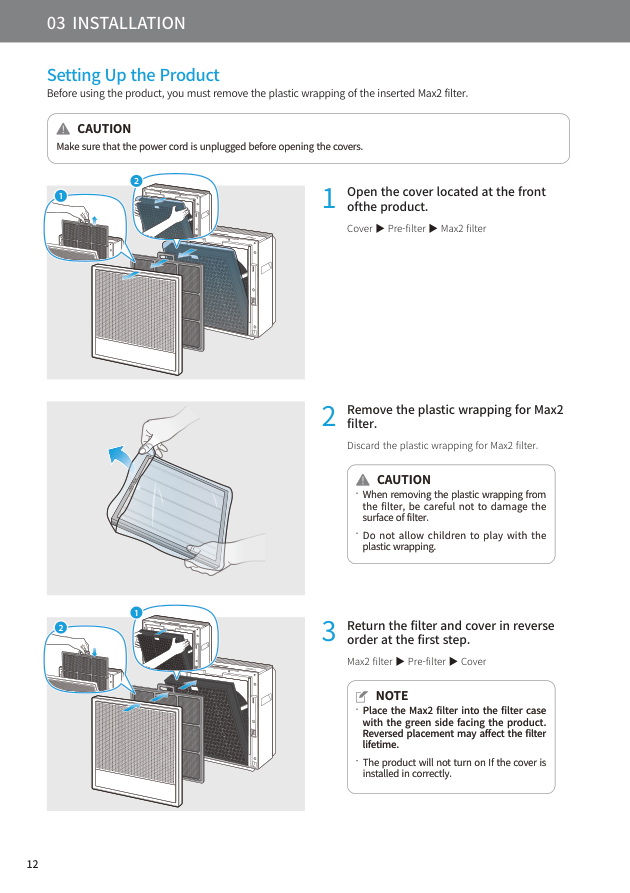
Before using the purifier, unplug it and open the front cover. Remove the parts in this order: front cover, pre-filter, then Max2 filter. Take the Max2 filter out and remove the plastic wrapping. Throw away the plastic and keep it away from children.
When reinstalling the Max2 filter, make sure the green side faces the product. Reversed placement may affect filter life and performance. Then reinstall the pre-filter and close the front cover. If the cover is not installed correctly, the product may not turn on.
3. Plug In and Turn On the Purifier
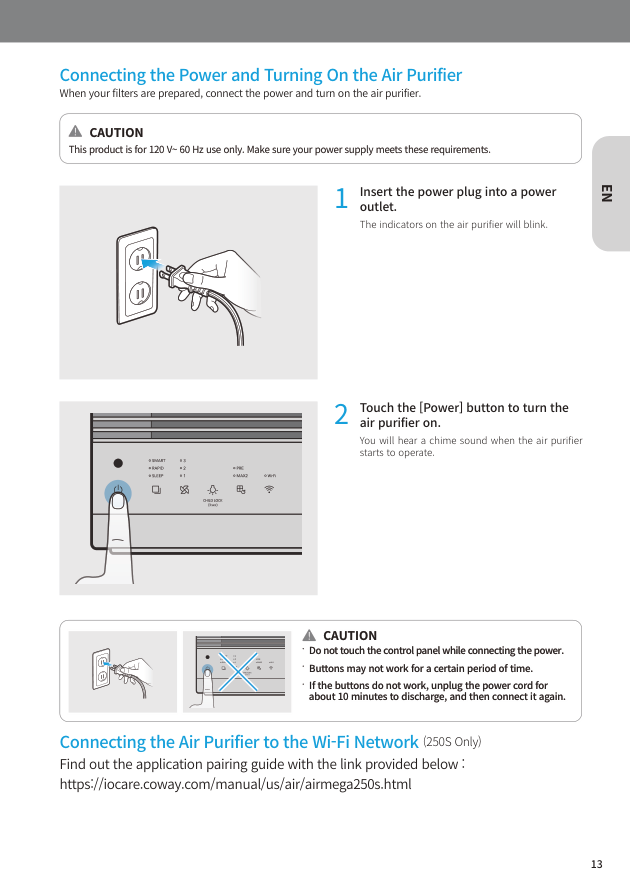
After the filters are prepared, insert the power plug into a suitable wall outlet. Once connected, the indicators on the air purifier may blink. Touch the Power button to turn the purifier on. You should hear a chime when it starts.
Do not touch the control panel while connecting the power. If the buttons do not work immediately, wait briefly. When the product operates for the first time, it starts in Smart mode.
4. Understand the Control Panel
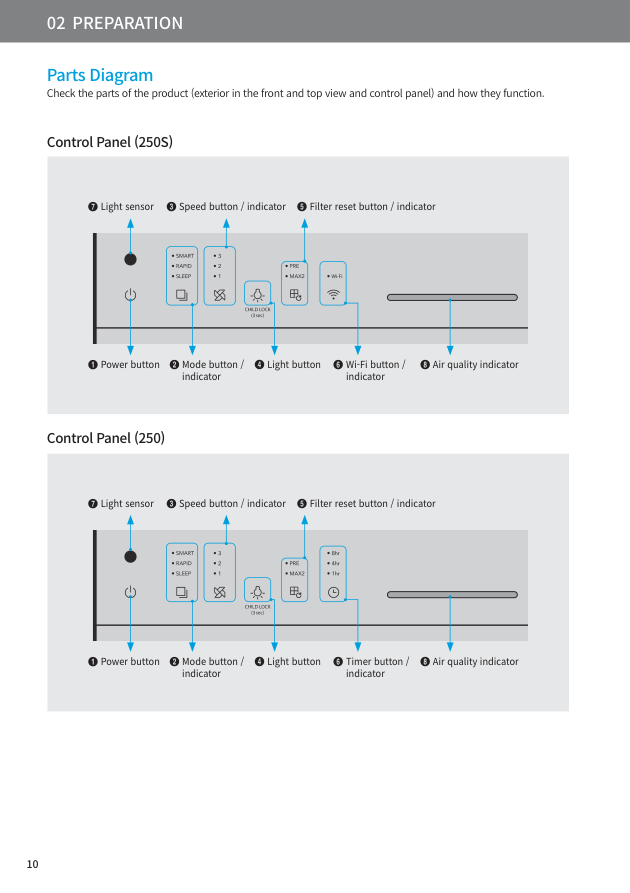
The Power button turns the purifier on and off. The Mode button cycles through Smart mode, Rapid mode, and Sleep mode. The Speed button manually selects fan level 1, level 2, or level 3. The Light button controls the display and air quality indicator lights. The Filter reset button is used after cleaning or replacing filters.
The air quality indicator shows the current indoor air quality using LED colors.
The Airmega 250S adds a Wi-Fi button for connecting to the Airmega app. The Airmega 250 has a Timer button instead, allowing automatic shutoff after 1 hour, 4 hours, or 8 hours.
5. Use Smart Mode for Daily Operation
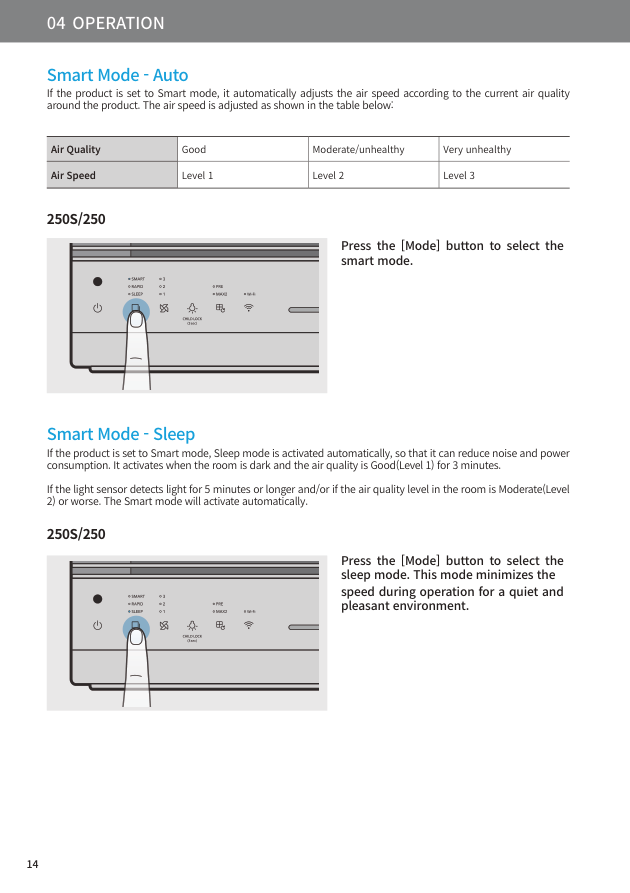
Smart mode is the best default setting for most homes. In Smart mode, the purifier automatically adjusts fan speed based on air quality around the product. If the air quality is Good, it runs at level 1. If air quality is Moderate or Unhealthy, it runs at level 2. If air quality is Very unhealthy, it runs at level 3.
This mode is useful because you do not need to constantly change fan speed. It balances cleaning power, noise, and energy use.
6. Use Sleep Mode for Quiet Rooms
Sleep mode minimizes fan speed for a quieter environment. It is useful at night, during naps, or while working in a quiet room. Smart mode can also activate sleep behavior automatically. If the room is dark and the air quality is Good for 3 minutes, Sleep mode can activate to reduce noise and power consumption. If the light sensor detects light for 5 minutes or longer, or if the air quality becomes Moderate or worse, Smart mode activates again.
7. Use Rapid Mode for Fast Cleaning
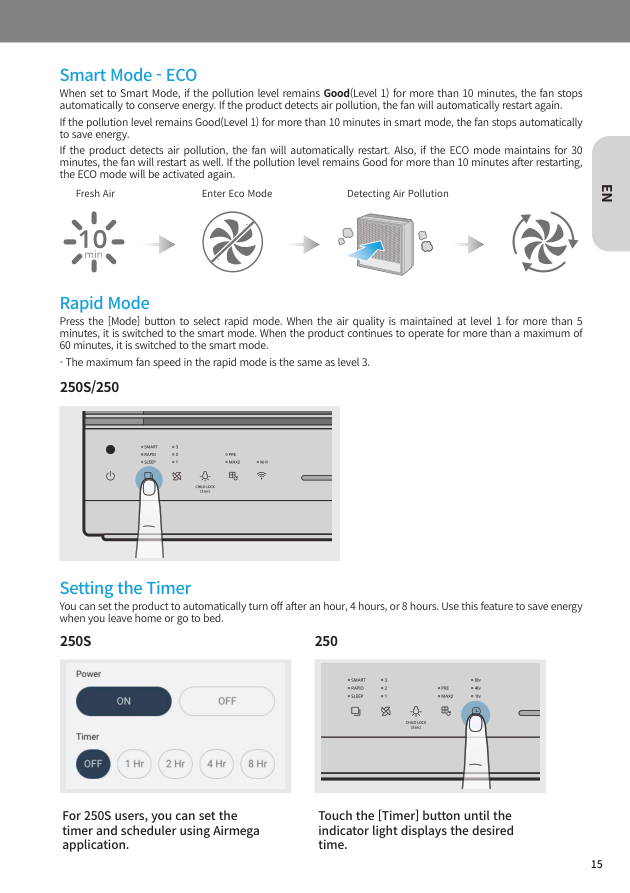
Rapid mode cleans air quickly. Use it after cooking, vacuuming, changing cat litter, strong pet odor, dust disturbance, pollen entering through a window, or smoke exposure. In Rapid mode, the maximum fan speed is the same as level 3.
The purifier does not stay in Rapid mode forever. If the air quality stays at level 1 for more than 5 minutes, it switches back to Smart mode. It also switches to Smart mode after operating in Rapid mode for up to 60 minutes.
8. Understand Eco Behavior in Smart Mode
In Smart mode, the fan may stop automatically when the pollution level remains Good for more than 10 minutes. This is Eco behavior, not a malfunction. It helps conserve energy when the air is already clean. If the purifier detects pollution again, the fan restarts automatically.
The manual also explains that if Eco mode continues for 30 minutes, the fan restarts. If the air remains Good for more than 10 minutes after restarting, Eco mode can activate again.
9. Adjust Fan Speed Manually
Use the Speed button when you want direct control. Press the button to cycle through level 1, level 2, and level 3. Level 1 is quiet and suitable when the air is already clean. Level 2 is good for normal use. Level 3 provides the strongest airflow and is useful when odor, dust, or pollution is noticeable.
Manual speed is helpful when you know the room needs extra cleaning. For example, after cleaning a dusty room or cooking a strong-smelling meal, use level 3 for a short period, then return to Smart mode.
10. Read the Air Quality Indicator Colors
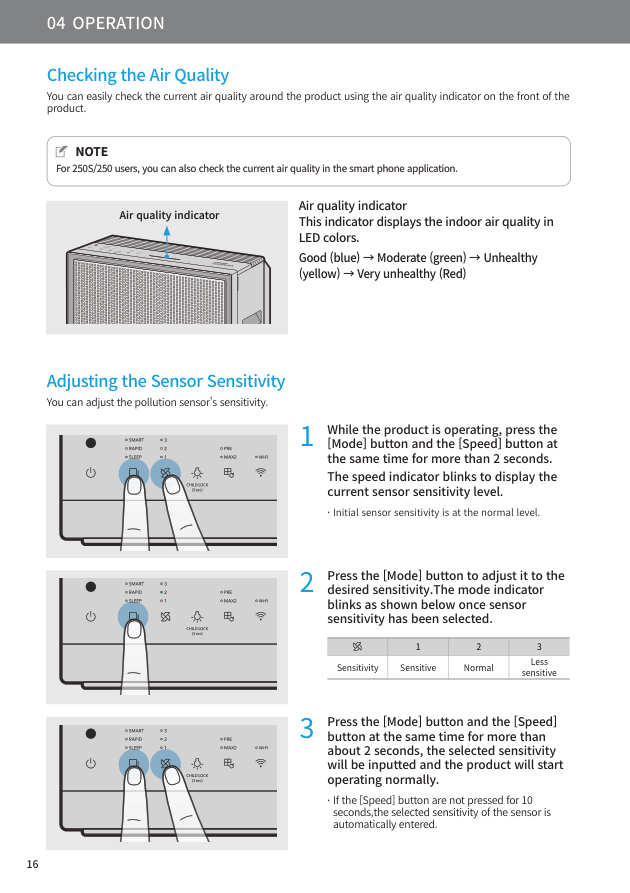
The air quality indicator displays the indoor air quality in LED colors. Blue means Good. Green means Moderate. Yellow means Unhealthy. Red means Very unhealthy.
| Indicator Color | Meaning | Suggested Action |
|---|---|---|
| Blue | Good | Use Smart mode or low speed. |
| Green | Moderate | Continue Smart mode or use level 2. |
| Yellow | Unhealthy | Use Rapid mode or level 3. |
| Red | Very unhealthy | Keep the purifier running high and check pollution sources. |
Remember that the indicator reads the air around the purifier. If the purifier is far from the pollution source, it may react more slowly.
11. Adjust Sensor Sensitivity
You can adjust the pollution sensor sensitivity. While the purifier is operating, press the Mode and Speed buttons together for more than 2 seconds. The speed indicator blinks to show the current sensitivity level. The initial level is Normal.
Press the Mode button to choose Sensitive, Normal, or Less sensitive. Then press Mode and Speed together again for more than about 2 seconds to save the setting and return to normal operation. If you do nothing for 10 seconds, the selected sensitivity is entered automatically.
For most users, Normal is best.
12. Use the Timer or Wi-Fi Features
On the Airmega 250, press the Timer button until the desired time indicator appears. You can set the purifier to turn off after 1 hour, 4 hours, or 8 hours. On the Airmega 250S, timer and scheduler functions are controlled through the Airmega app. The 250S also allows Wi-Fi connection, remote control, and app-based air quality checking.
13. Control the Lights and Child Lock
The Light button turns the air quality indicator and display indicators on or off. Pressing the Light button changes the lights in this order: air quality indicator off, all indicators off, then all indicators on. The control panel also shows Child Lock as a 3-second function near the Light button. A long press can help prevent accidental button operation by children or pets.
14. Reset the Filter Indicator
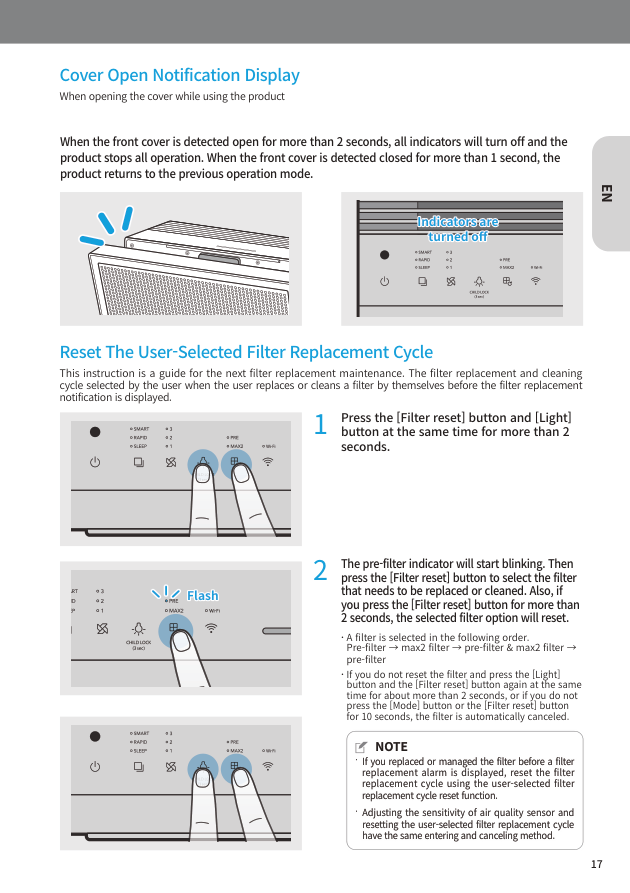
When the filter replacement indicator turns on, clean or replace the correct filter first. Then press the corresponding Filter reset button for more than 3 seconds. If both PRE and MAX2 indicators turn on together, both filters can be reset at once.
If you cleaned or replaced a filter before the indicator appeared, use the user-selected reset function. Press the Filter reset and Light buttons together for more than 2 seconds. The pre-filter indicator starts blinking. Press Filter reset to select pre-filter, Max2 filter, or both. Hold Filter reset for more than 2 seconds to reset the selected filter cycle.
Do not wash or reuse the Max2 filter. The pre-filter can be cleaned, but the Max2 filter should be replaced when needed.
15. What If the Front Cover Opens?
If the front cover is detected open for more than 2 seconds, all indicators turn off and the purifier stops operating. When the cover is closed for more than 1 second, it returns to the previous mode. If your purifier stops after filter cleaning, check that the front cover is fully closed.
Best Daily Routine
For most homes, leave the purifier in Smart mode during the day. Use Sleep mode at night if noise or lights bother you. Use Rapid mode after cooking, cleaning, pet odor, pollen exposure, or any sudden pollution event. Watch the air quality color and let the purifier run until the light improves.
Do not block airflow. Clean the pre-filter regularly, replace the Max2 filter when needed, and reset the filter indicator after maintenance. Always unplug the purifier before opening covers or handling filters.
FAQ
What is the best mode for a Coway air purifier?
Smart mode is the best everyday mode because it automatically changes fan speed based on air quality.
Why is my Coway air purifier not turning on?
Check the power plug, outlet, and front cover. The purifier may not turn on if the cover is installed incorrectly.
What do the Coway air quality colors mean?
Blue means Good, green means Moderate, yellow means Unhealthy, and red means Very unhealthy.
How do I reset the filter light?
After cleaning or replacing the filter, press the Filter reset button for more than 3 seconds when the indicator is on.
Is the Airmega 250S different from the 250?
Basic operation is the same. The 250S has Wi-Fi and app control, while the 250 has a physical Timer button.
Conclusion
To use a Coway air purifier correctly, remove the Max2 filter plastic, install the filters in the right direction, close the front cover, plug in the purifier, and press Power. Start with Smart mode for daily use, choose Rapid mode for fast cleaning, and use Sleep mode at night. Read the air quality colors, clean or replace filters on schedule, and reset the filter indicator after maintenance. Once set up properly, the Coway Airmega 250 or 250S can run with very little daily adjustment.