How to Use a Gas Samsung Steam Dryer: Cycles, Steam, Rack Dry & Safety
A gas Samsung steam dryer can do much more than simply dry clothes. It can dry everyday laundry, sense moisture automatically, run timed drying cycles, refresh lightly worn clothes with steam, sanitize suitable fabrics, reduce wrinkles, dry shoes or sweaters on a rack, and connect to SmartThings on supported models.
For a beginner, the easiest way to understand it is this: clean the lint filter, load the dryer correctly, choose the right cycle, adjust options if needed, then press and hold Start/Pause. This guide explains how to use a gas Samsung steam dryer safely and effectively, including Sensor Dry, Manual Dry, Steam Sanitize, Refresh, Wrinkle Prevent, drying rack use, SmartThings, and basic troubleshooting.
1. Check Basic Gas Dryer Safety First
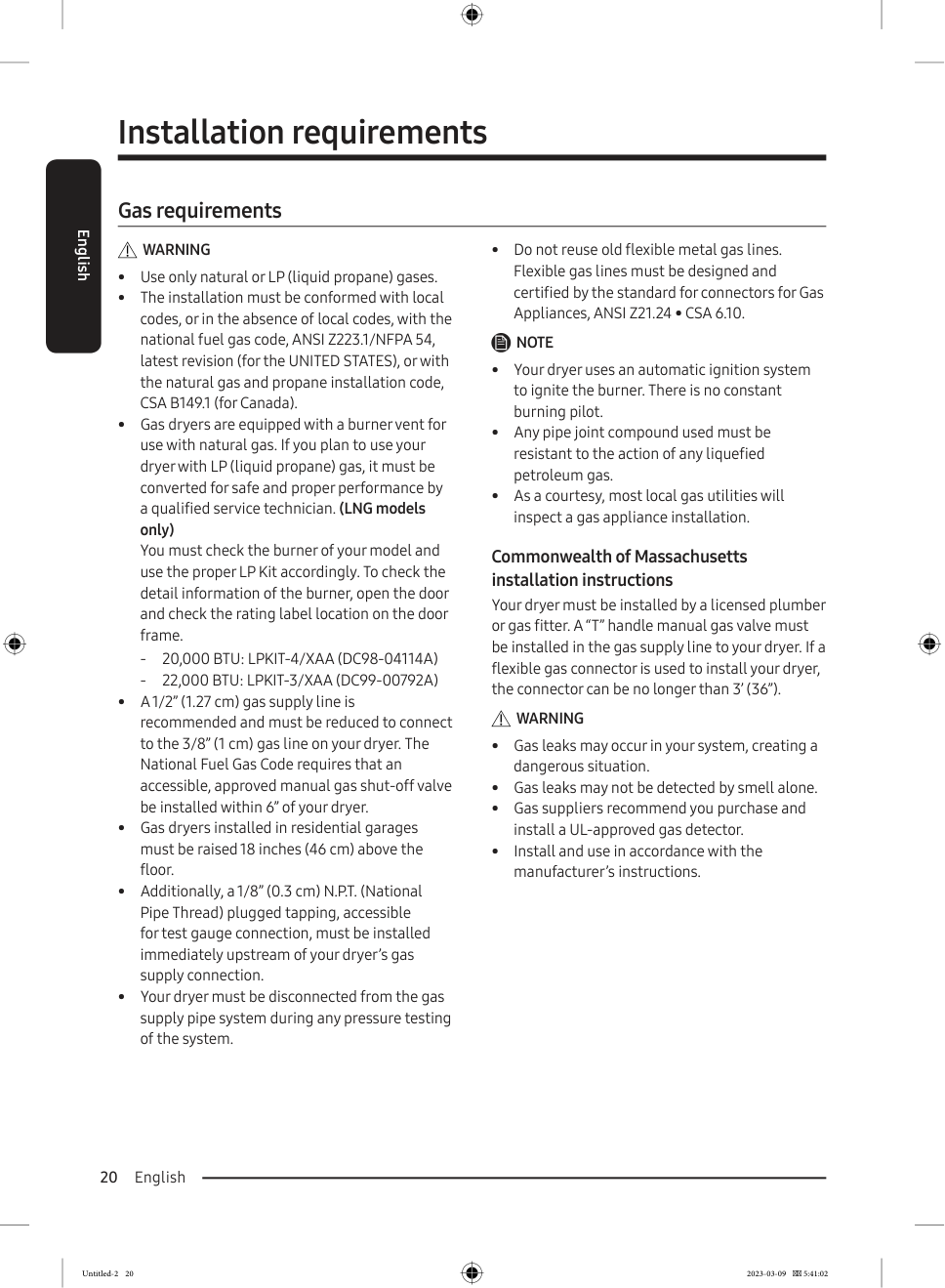
Because this is a gas dryer, safety comes first. Make sure the dryer has been professionally installed and connected to the correct gas supply. Gas Samsung dryers are designed for natural gas or LP gas, depending on the model and installation. If your dryer uses LP gas, the conversion should be handled by a qualified technician. Do not try to modify the gas system yourself.
A gas dryer also needs a proper exhaust system. The dryer should vent outdoors, not into a wall, ceiling, attic, crawl space, garage, or hidden building space. A blocked or incorrect vent can cause long drying times, poor airflow, overheating, and fire risk.
| Checkpoint | Why It Matters |
|---|---|
| Gas valve is open | The dryer cannot heat if the gas supply is off. |
| Dryer is plugged in | Gas models still need electricity for controls and ignition. |
| Exhaust vent is connected | Moisture, heat, lint, and exhaust air must go outdoors. |
| Lint filter is clean | A clean filter improves airflow and reduces fire risk. |
| Door closes fully | The dryer will not start if the door is not latched. |
Safety note: If you ever smell gas, do not start the dryer. Do not touch electrical switches. Leave the area and contact the gas supplier or emergency service from a safe location.
2. Connect Water for Steam Features
Steam cycles need a cold water connection. If the dryer is not connected to water, steam features such as Refresh or Steam Sanitize may not work correctly. The typical setup uses a Y-connector on the cold water tap. One hose goes to the washer, and the other hose goes to the dryer’s water inlet.
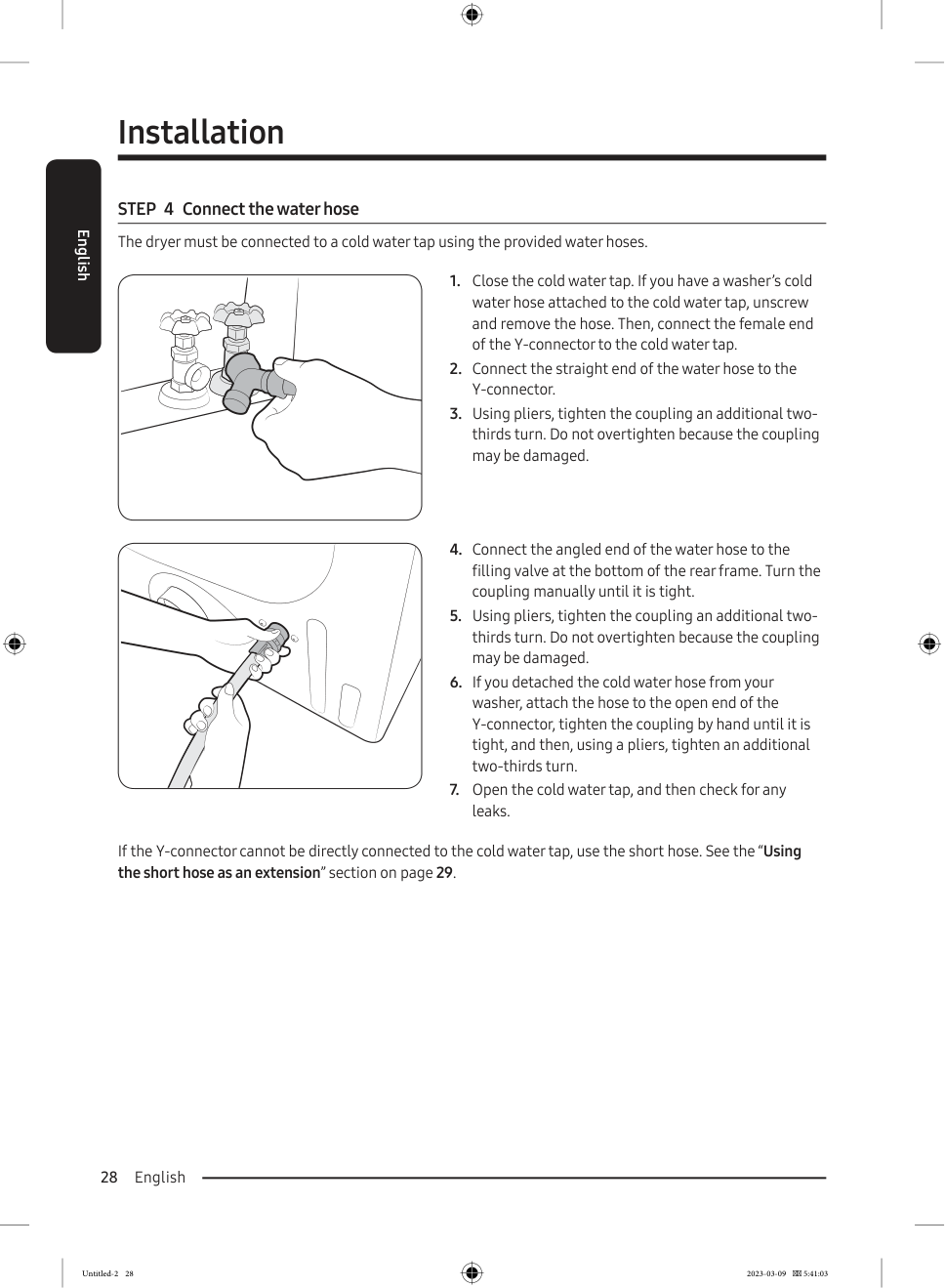
After connecting the hose, open the cold water tap and check carefully for leaks. Do not overtighten the hose connection. Tighten by hand first, then use pliers only as needed. After installation, check the floor and the back of the dryer for water leaks before using a steam cycle.
3. Sort and Load the Dryer Correctly
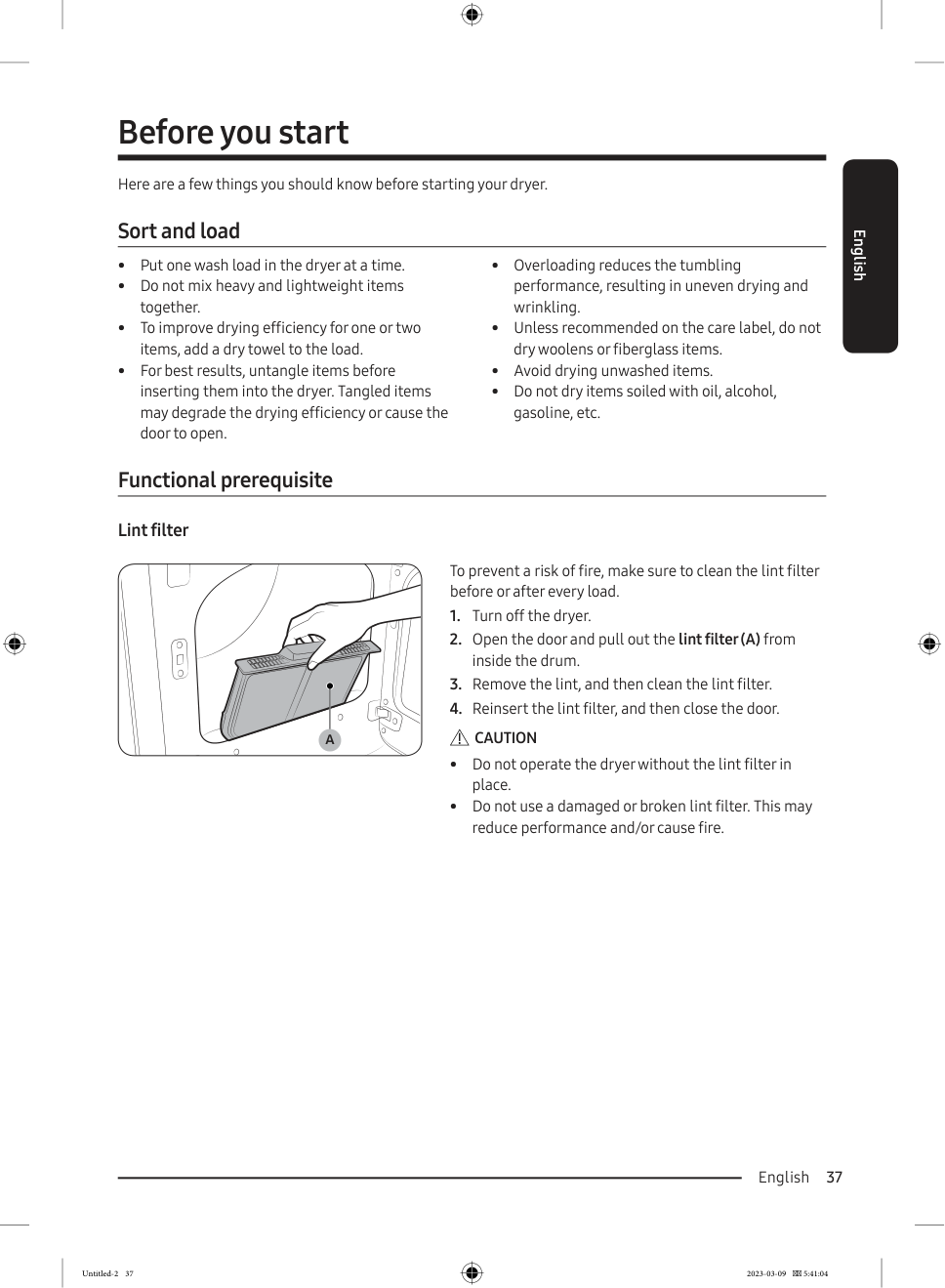
Good drying starts with the way you load the drum. Put one washer load into the dryer at a time. Do not overload the dryer because clothes need space to tumble freely. Separate heavy and lightweight items. Towels, jeans, blankets, and work clothes take longer to dry than shirts, underwear, and lightweight cottons.
| Load Size | Drum Fill Level |
|---|---|
| Small load | 3–5 items, no more than 1/4 full. |
| Medium load | About 1/2 full. |
| Large load | About 3/4 full. |
| Too full | Clothes are packed tightly and cannot tumble. |
Before loading, untangle clothes, shake out sheets and large items, check pockets, and follow the fabric care label. Do not dry items soiled with oil, gasoline, alcohol, wax, or flammable substances. For one or two small items, adding a clean dry towel can help the load tumble better.
4. Clean the Lint Filter Every Time
Before every load, clean the lint filter. Open the door, pull out the lint filter, remove lint, clean the filter, reinsert it, and close the door. Do not run the dryer without the lint filter in place.
| Problem | Cause |
|---|---|
| Long drying time | Airflow is restricted. |
| Clothes remain damp | Moist air cannot escape efficiently. |
| Dryer feels too hot | Heat builds up inside the dryer. |
| Burning smell | Lint may overheat. |
| Fire risk | Lint is flammable. |
5. Understand the Control Panel
The control panel may look different depending on the exact model, but most Samsung gas steam dryers use the same basic controls. For most everyday use, you only need three controls: Power, Cycle Selector, and Start/Pause.
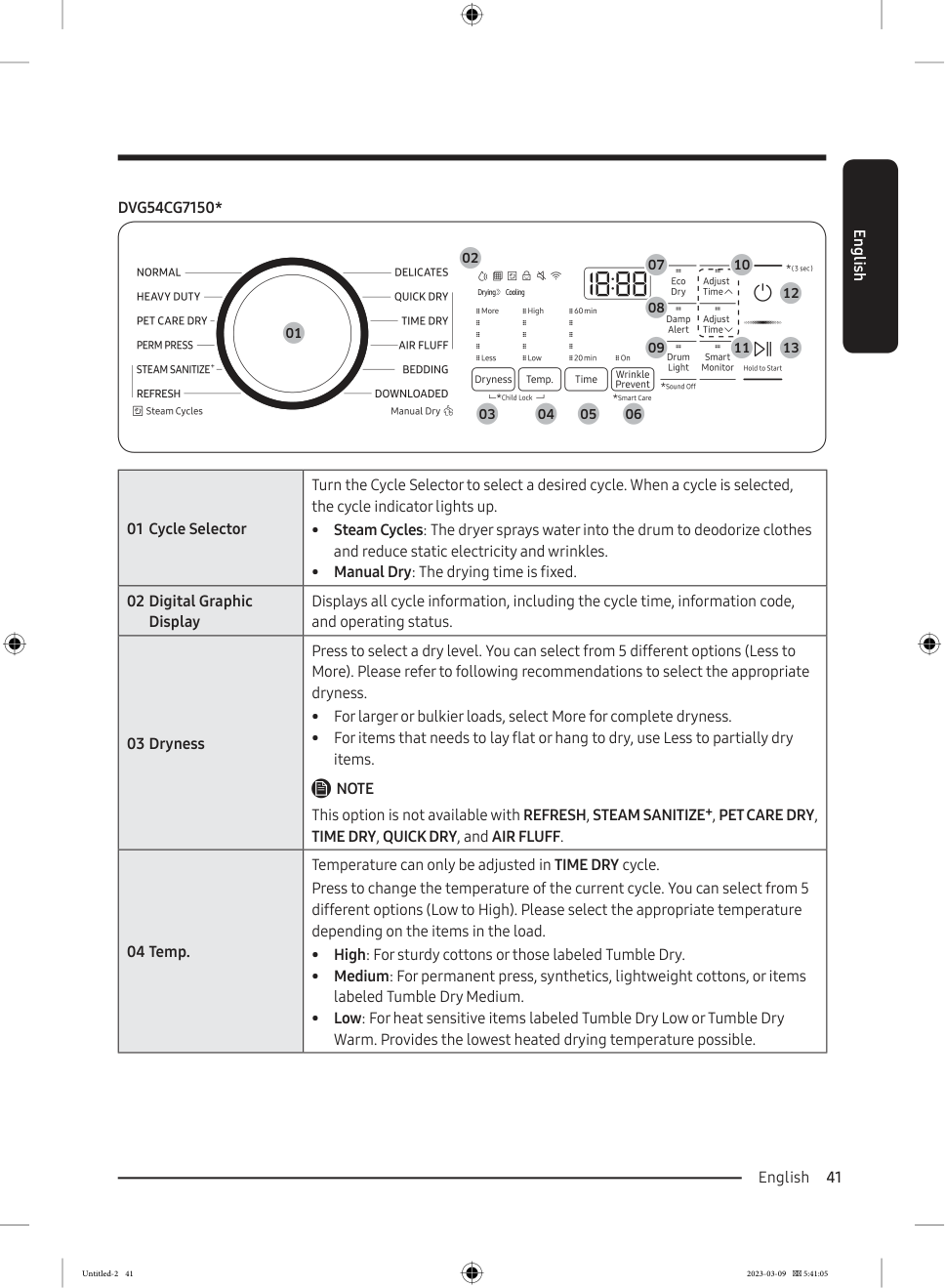
| Control | Function |
|---|---|
| Power | Turns the dryer on or off. |
| Cycle Selector | Chooses the drying cycle. |
| Display | Shows time, status, and information codes. |
| Dryness | Adjusts how dry the load should be on supported cycles. |
| Temp | Adjusts temperature on supported timed cycles. |
| Time / Adjust Time | Changes drying time on Manual Dry cycles. |
| Wrinkle Prevent | Tumbles clothes after drying to reduce wrinkles. |
| Eco Dry | Saves energy but may increase drying time. |
| Damp Alert | Alerts when mixed loads are partly dry. |
| Start/Pause | Starts or pauses the cycle. |
6. Basic Steps to Start the Dryer
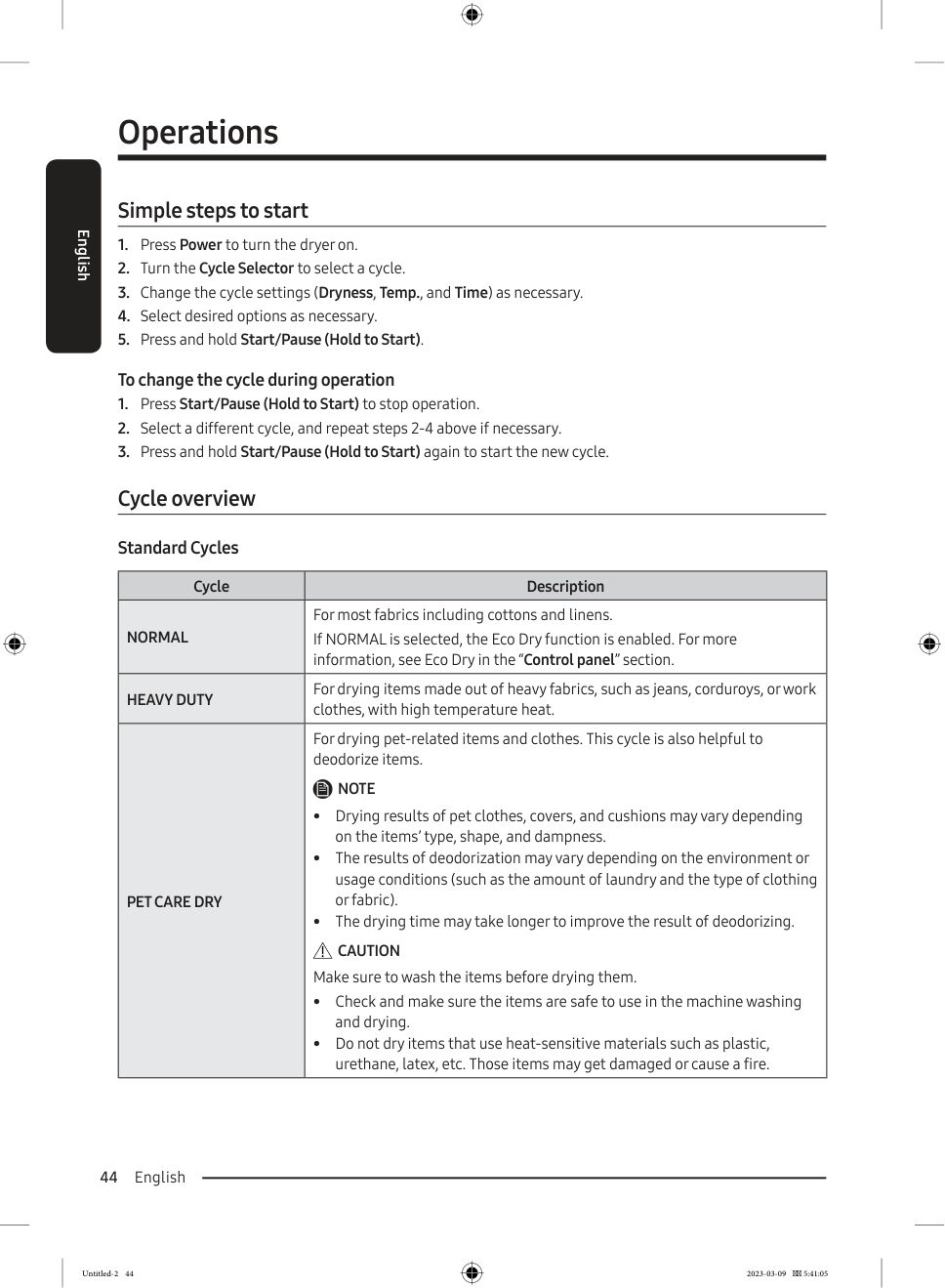
Follow these steps: clean the lint filter, load the dryer, close the door firmly, press Power, turn the Cycle Selector, adjust Dryness, Temp, or Time if needed, select options such as Wrinkle Prevent or Damp Alert, and press and hold Start/Pause.
If you want to change the cycle after the dryer has started, press Start/Pause, choose a new cycle, adjust the settings, then press and hold Start/Pause again.
7. Use Sensor Dry for Everyday Laundry
Sensor Dry is the best choice for most loads. Instead of drying for a fixed time, the dryer senses moisture inside the drum and adjusts drying time automatically.
| Cycle | Best For |
|---|---|
| Normal | Cotton, linens, and mixed everyday clothes. |
| Heavy Duty | Jeans, work clothes, and thick fabrics. |
| Perm Press | Synthetic fabrics, knits, and wrinkle-free cotton. |
| Delicates | Underwear, blouses, lingerie, and heat-sensitive items. |
| Bedding | Sheets, blankets, comforters, and pillows. |
| Pet Care Dry | Suitable washed pet items and pet-related fabrics. |
For bulky loads, choose a higher dryness level such as More. For clothes you want to hang dry or lay flat after partial drying, choose Less. Do not use high heat on delicate fabrics unless the care label allows it.
8. Use Manual Dry When You Want Fixed Time
Manual Dry is useful when you want to control the drying time yourself. This is different from Sensor Dry because the dryer runs for a set time instead of deciding based on moisture.
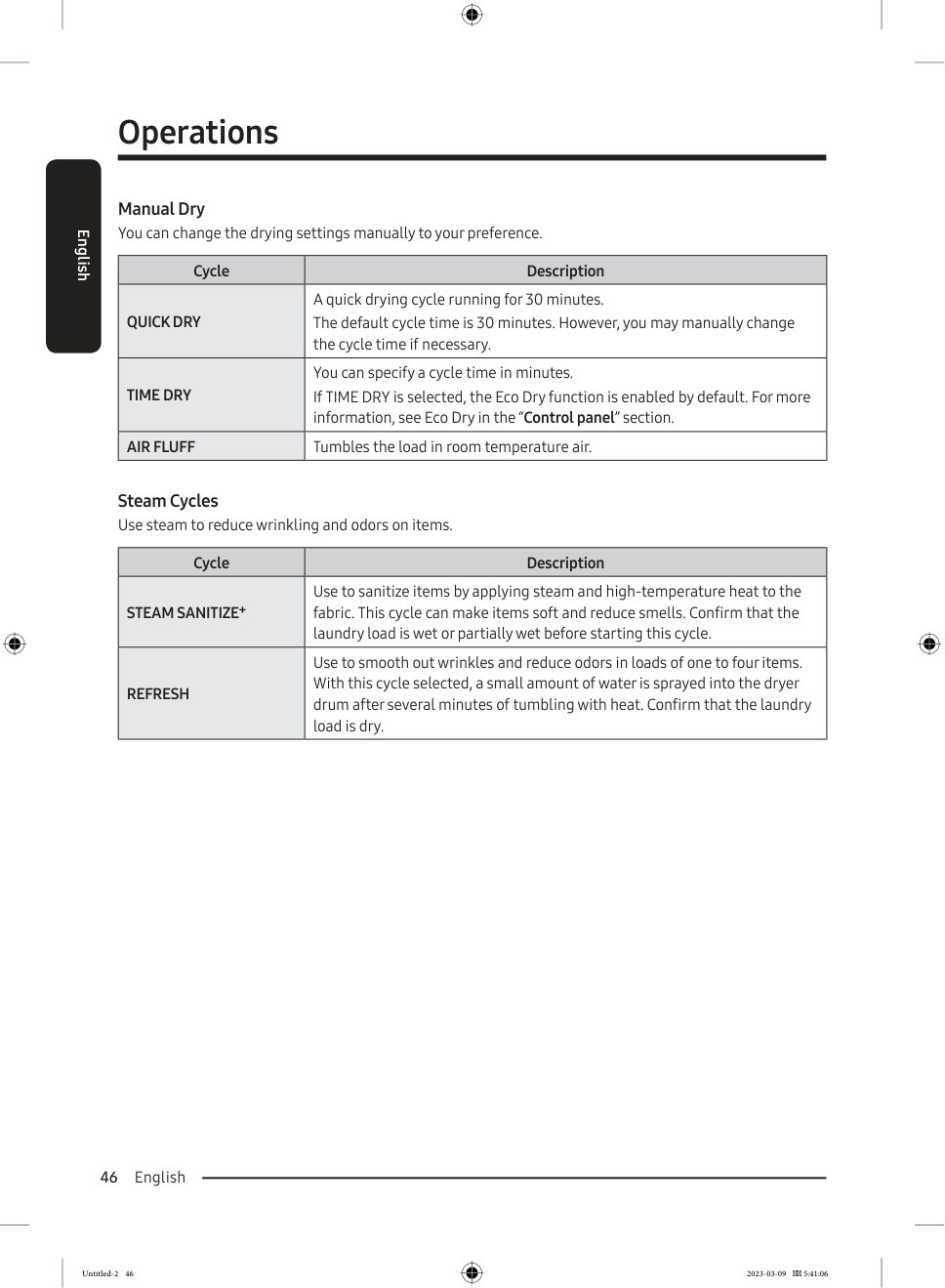
| Cycle | Best For |
|---|---|
| Quick Dry | Small loads that need fast drying. |
| Time Dry | Loads that need a specific drying time. |
| Air Fluff | No-heat tumbling for heat-sensitive items. |
Use Quick Dry for a small number of clothes. Use Time Dry when clothes are still slightly damp after another cycle. Use Air Fluff when the item should tumble without heat. Use high heat for sturdy cottons, medium heat for permanent press and synthetics, and low heat for heat-sensitive fabrics.
9. Use Steam Sanitize Correctly
Steam Sanitize uses steam and high-temperature heat on suitable fabrics. It is useful for items that can tolerate heat and moisture. For Steam Sanitize, the load should usually be wet or partially wet before starting. Do not use this cycle for foam, rubber, plastic, wool, delicate fabrics, or items that cannot handle high heat.
| Suitable Item | Notes |
|---|---|
| Bedding | Check the care label first. |
| Curtains | Use only if heat is allowed. |
| Children’s clothing | Suitable washable fabrics only. |
| Towels | Best if high heat is allowed. |
| Cotton items | Good for durable fabrics. |
Steam Sanitize is not a replacement for washing. If the item is dirty, wash it first.
10. Use Refresh for Light Wrinkles and Odors
Refresh is a steam cycle for dry items. It is designed to smooth light wrinkles and reduce odors in a small load. It works best with one to four dry items. Do not overload the drum, or steam will not circulate well.
| Item | Best Use |
|---|---|
| Shirts | Light wrinkle reduction. |
| Trousers | Freshening between washes. |
| Small comforters | Light odor reduction. |
| Pillows | Only if the care label allows it. |
11. Use Wrinkle Prevent and Damp Alert
Wrinkle Prevent is useful when you cannot remove clothes immediately after the cycle ends. After drying, the dryer tumbles the load intermittently with unheated air. The clothes are already dry during Wrinkle Prevent, so you can remove them at any time.
Damp Alert is helpful when a load contains different fabric types. It alerts you when the load is mostly dry, so you can remove lighter items before they overdry. For example, if you dry shirts and jeans together, the shirts may dry first. Remove the shirts when Damp Alert sounds, then let the jeans continue drying.
12. Use the Drying Rack
Some Samsung dryers include a drying rack. The rack lets items dry without tumbling. This is useful for shoes, sweaters, stuffed toys, and delicate items.
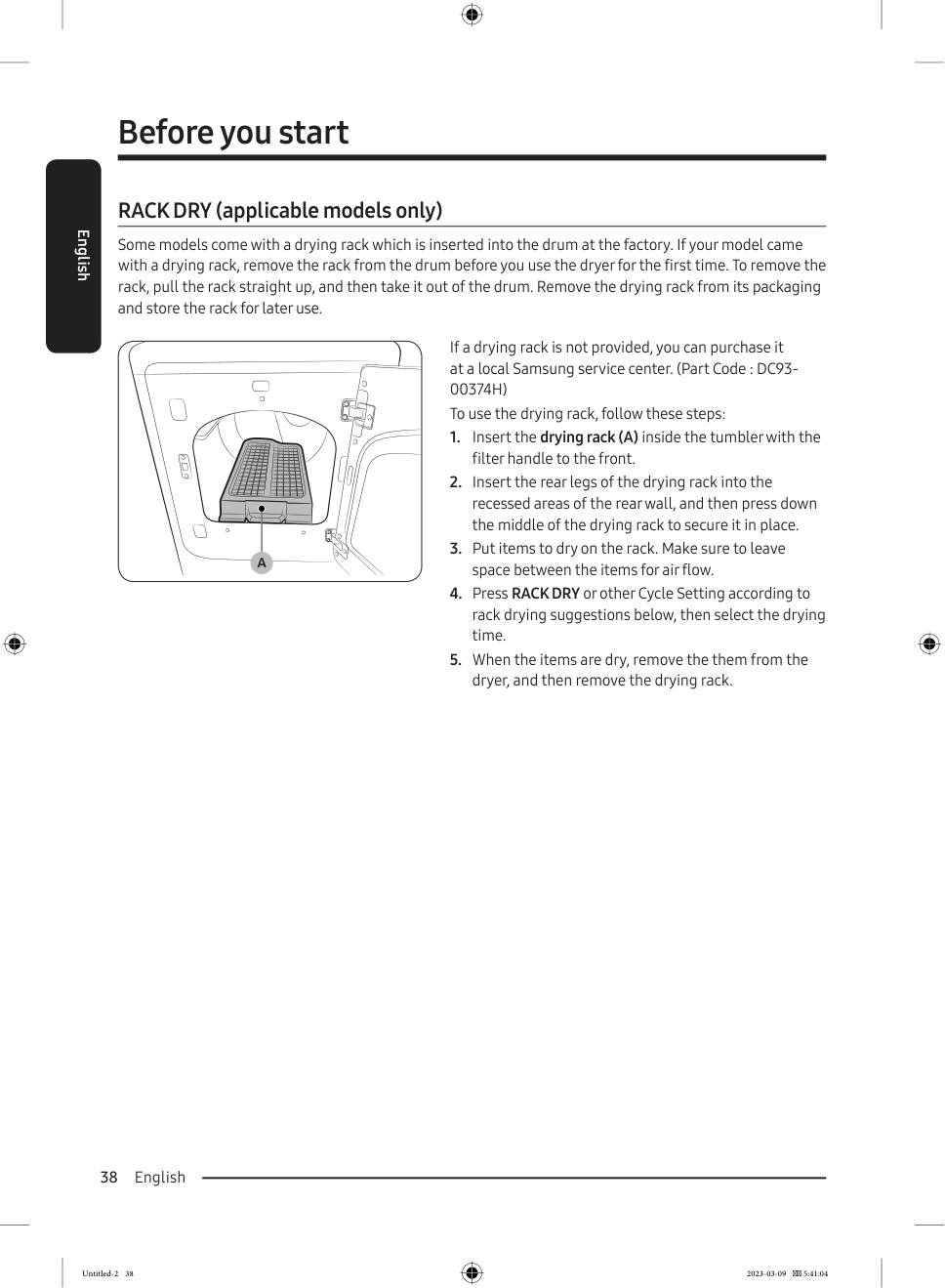
To use the drying rack, open the dryer door, insert the rack into the drum, place the rear legs into the recessed areas at the back, press the rack down so it is secure, put items on the rack with space between them, choose Rack Dry, Time Dry, or Air Fluff, set the drying time, then remove the items and rack after drying.
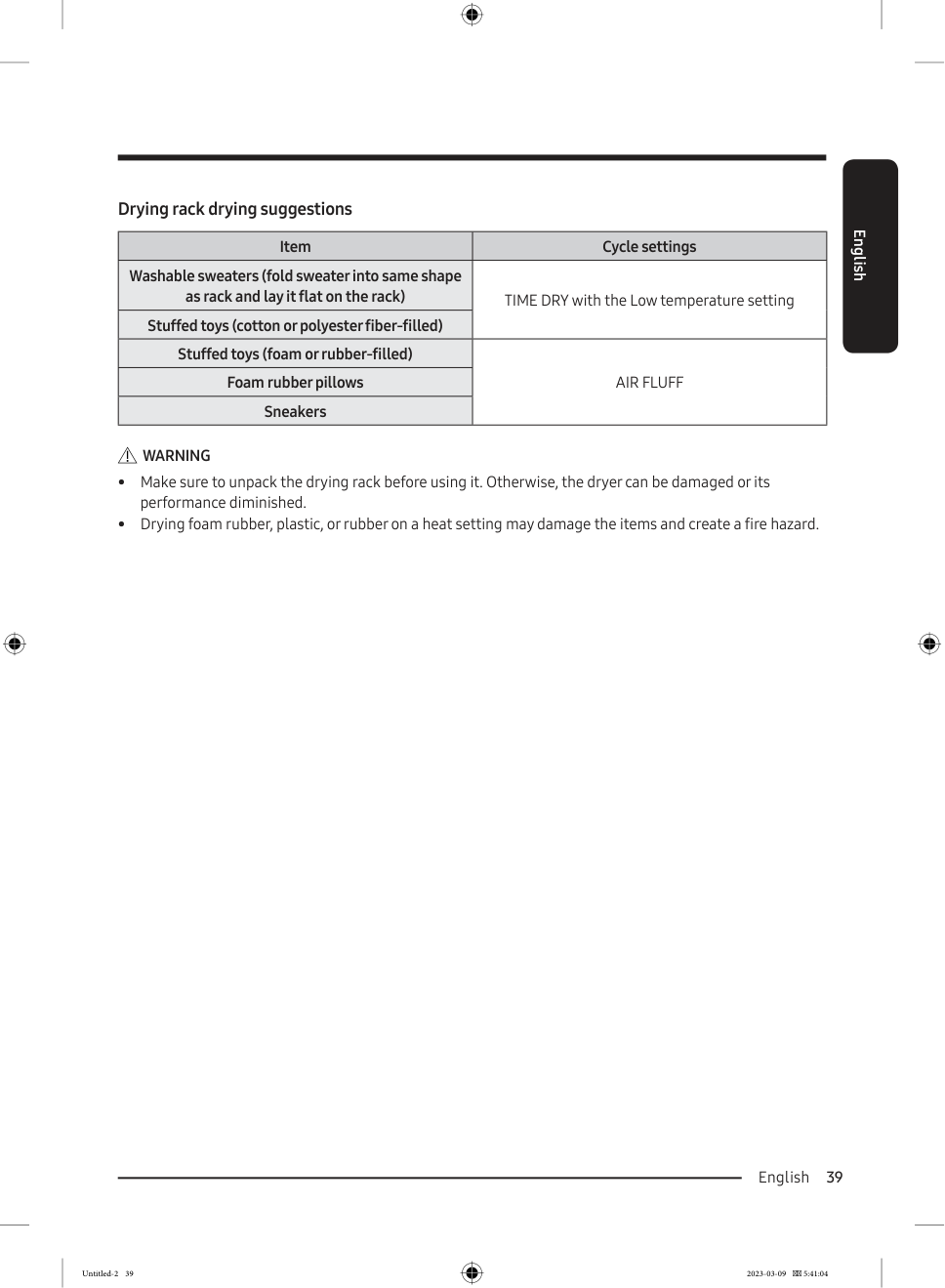
Use low heat for washable sweaters. Lay the sweater flat in its natural shape. For sneakers, foam rubber pillows, or rubber-filled toys, use Air Fluff instead of heat. Heat can damage rubber, foam, or plastic and may create a fire hazard.
13. Choose the Right Cycle by Item Type
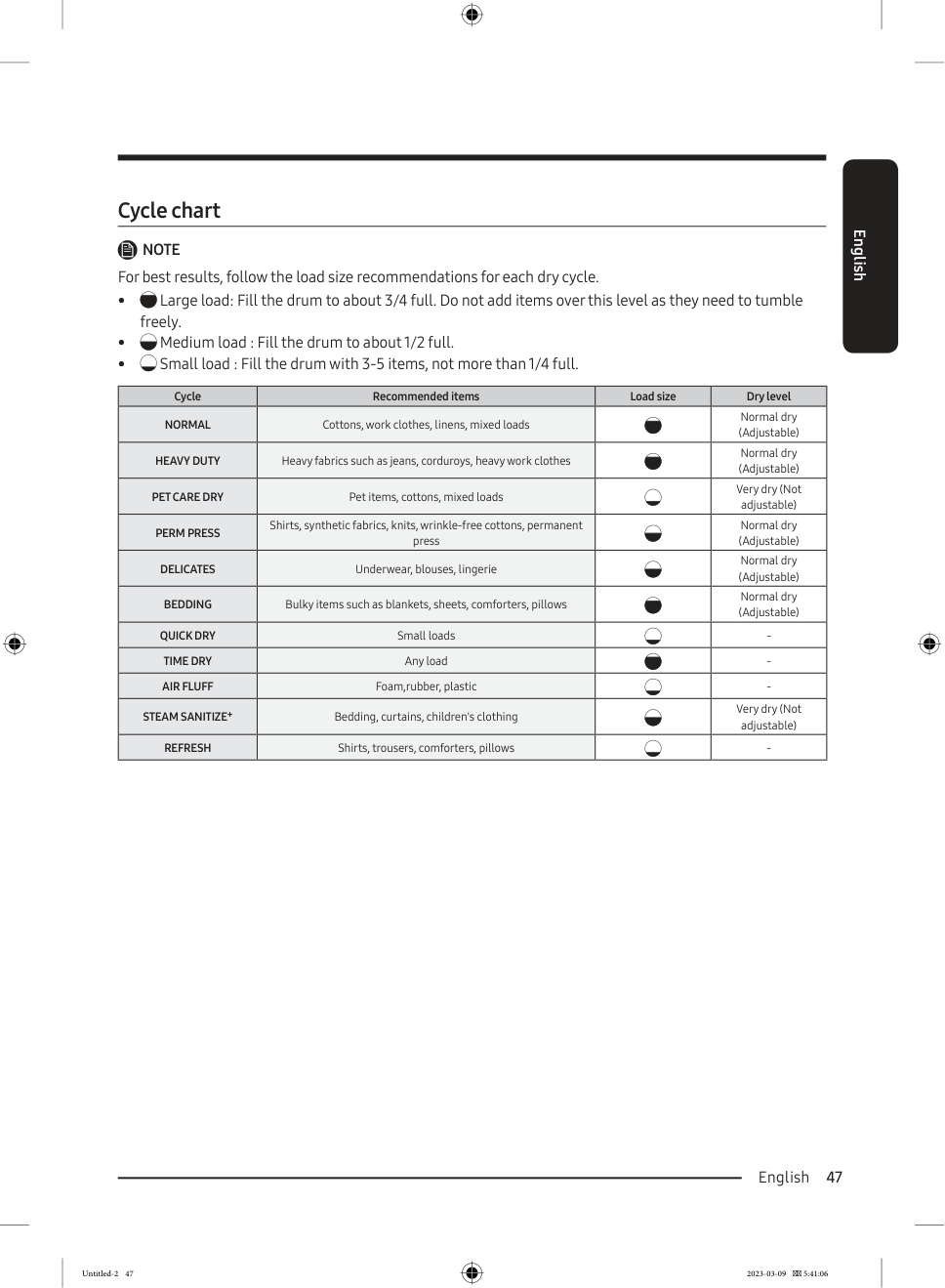
| Item Type | Recommended Cycle |
|---|---|
| Everyday cotton clothes | Normal |
| Jeans and work clothes | Heavy Duty |
| Synthetic shirts | Perm Press |
| Delicate underwear or blouses | Delicates |
| Sheets and blankets | Bedding |
| Small load | Quick Dry |
| Slightly damp clothes | Time Dry |
| Heat-sensitive items | Air Fluff or Low Temp |
| Dry clothes with light odor | Refresh |
| Suitable damp items needing steam | Steam Sanitize |
| Shoes or sweaters | Drying rack |
Always follow the care label first. If the care label says line dry, lay flat to dry, or do not tumble dry, do not use a normal heated cycle.
14. Use SmartThings if Your Model Supports It
Some Samsung gas dryers support SmartThings. To use it, connect your phone to a 2.4 GHz Wi-Fi network, install the SmartThings app, sign in with a Samsung account, and add the dryer.
SmartThings may allow you to monitor cycle status, receive notifications, access downloaded cycles, check information codes, and manage supported dryer functions. Some gas models may provide monitoring features rather than full remote control. Available features depend on the exact model.
15. Watch the Vent Sensor
Some models include a Vent Sensor. This feature helps detect airflow problems in the duct system. If the Vent Sensor light turns on, check the lint filter and duct. If it blinks, the duct may be severely clogged or restricted.
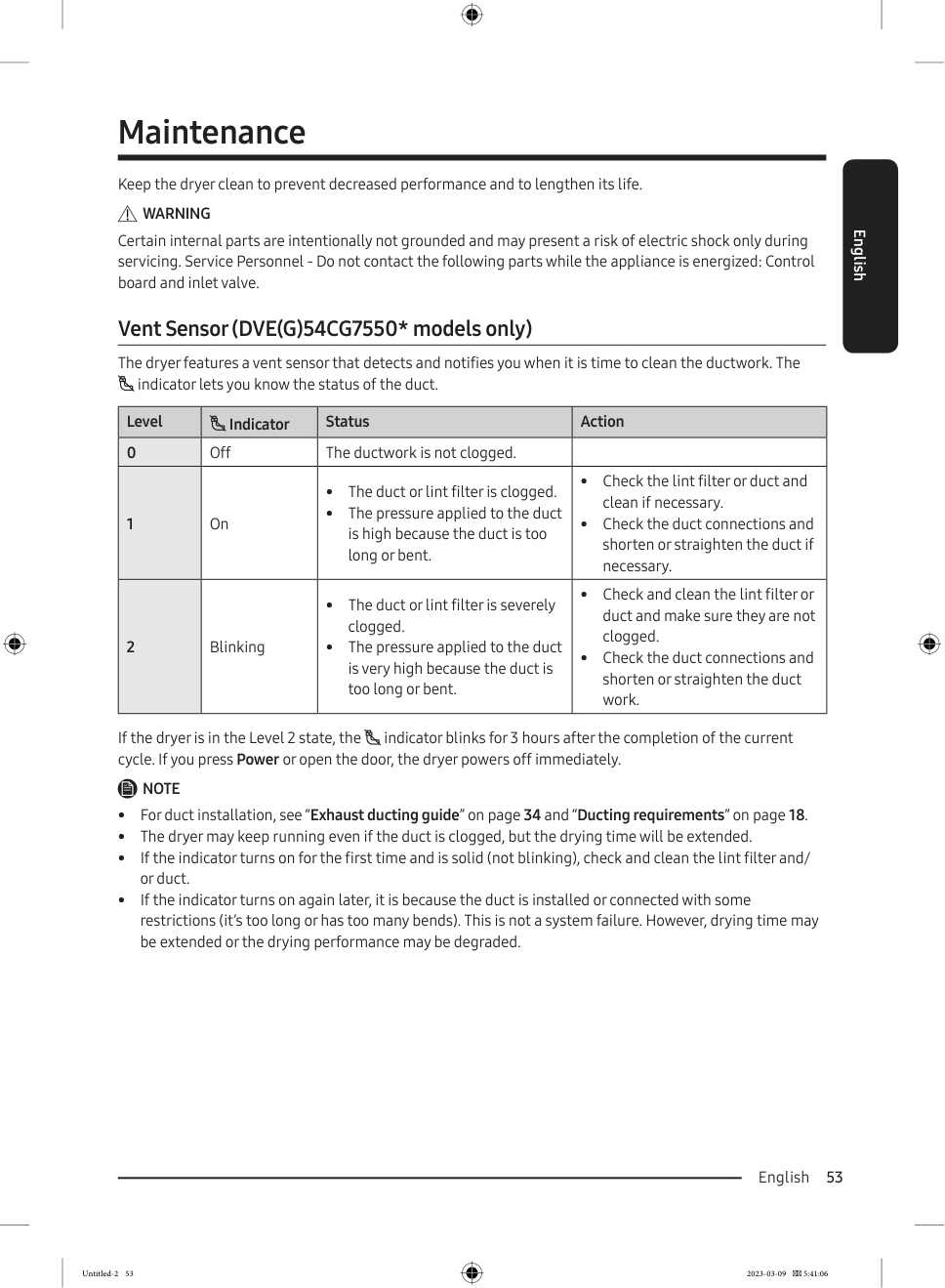
To improve airflow, clean the lint filter, check the outside exhaust hood, remove lint buildup, straighten crushed ductwork, shorten duct runs when possible, and avoid too many bends. Good airflow is especially important for gas dryers.
16. If the Dryer Does Not Heat
| Possible Cause | What to Check |
|---|---|
| Gas supply is off | Make sure the gas valve is open. |
| Wrong cycle selected | Air Fluff does not use heat. |
| Eco Dry is active | Heating may feel delayed. |
| Lint filter is clogged | Clean the lint filter. |
| Vent is blocked | Check duct and exhaust hood. |
| Dryer is cooling down | Wait for the cycle to finish. |
If the gas supply is on and the dryer still does not heat, stop using it and contact a qualified technician.
17. If Clothes Are Still Damp
| Problem | Solution |
|---|---|
| Load too large | Remove some items and restart. |
| Load too small | Add a few clean towels. |
| Heavy and light fabrics mixed | Dry separately. |
| Bulky item rolled into a ball | Reposition and restart. |
| Lint filter dirty | Clean the lint filter. |
| Exhaust vent restricted | Clean and check ductwork. |
| Washer did not spin well | Run extra spin before drying. |
For blankets and comforters, pause the cycle and reposition the item if needed. Large items can roll into a ball and trap moisture inside.
Final Tips
For everyday laundry, use Normal Sensor Dry. For jeans and thick fabrics, use Heavy Duty. For delicate fabrics, use Delicates. For fixed-time drying, use Time Dry. For no-heat tumbling, use Air Fluff. For lightly wrinkled dry clothes, use Refresh. For suitable damp items that need steam and high heat, use Steam Sanitize.
The most important habits are simple: clean the lint filter every load, do not overload the drum, separate heavy and light fabrics, use the correct cycle, keep the exhaust vent clear, take gas safety seriously, and do not dry oil-stained or flammable items.
Once you understand Sensor Dry, Manual Dry, Steam cycles, and Rack Dry, a gas Samsung steam dryer becomes easy to use.