How to Reset and Clean an LG Dryer: Fix d80, Flow Sense, No Heat & Long Drying Times
If you are searching for how to reset LG dryer, how to clean LG dryer filter, how to clean LG dryer vent, or how to fix Flow Sense on LG dryer, you are probably trying to solve one of three common problems: the dryer will not heat, clothes take too long to dry, or a warning such as d80 or Flow Sense appears on the control panel.
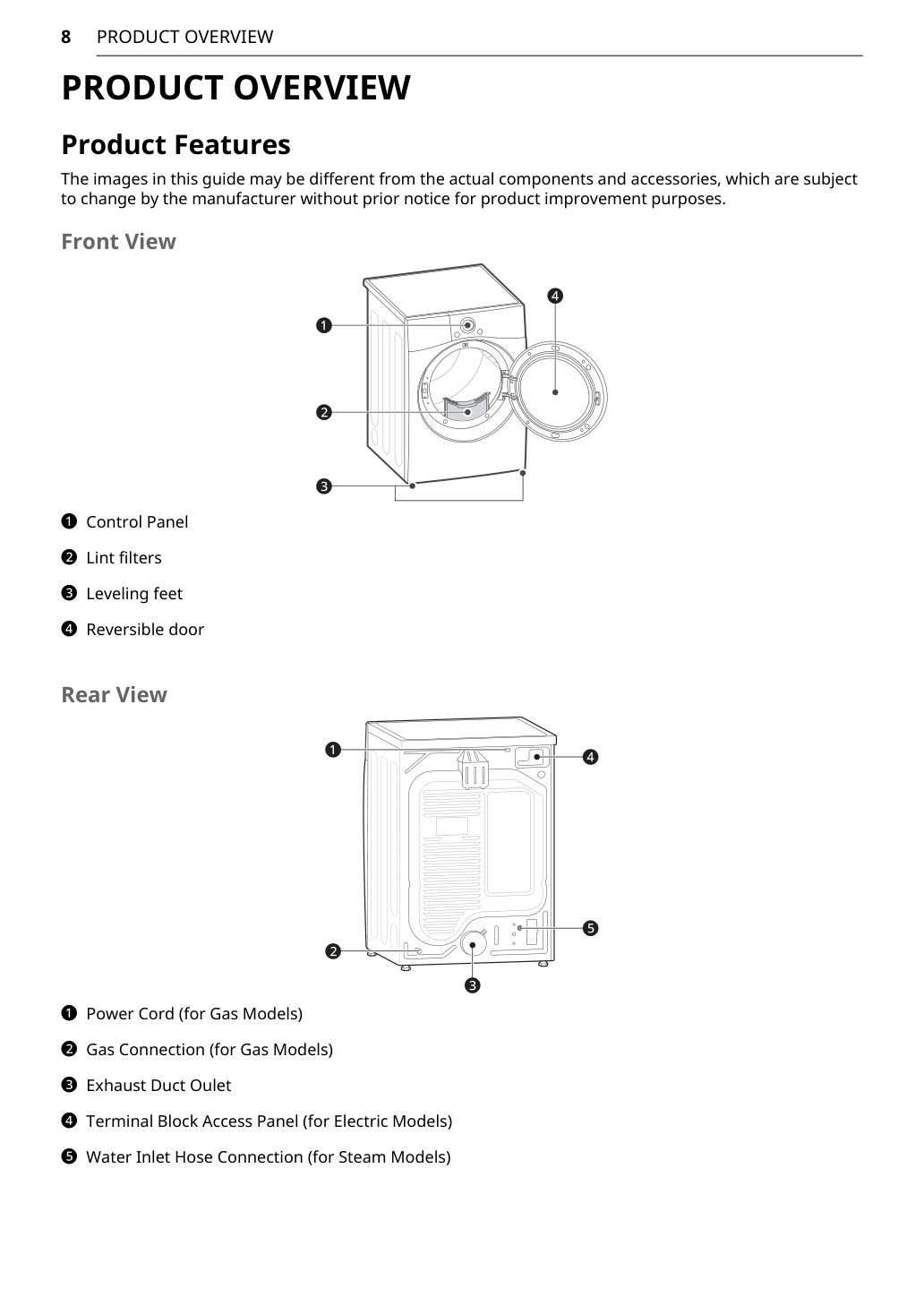
This guide explains how to use, reset, clean, and troubleshoot an LG dryer in a practical way. It is based on the LG Dryer Owner’s Manual for DL*340** / DL*347** models. The manual identifies key parts such as the control panel, lint filter, leveling feet, reversible door, exhaust duct outlet, terminal block access panel for electric models, gas connection for gas models, and water inlet hose connection for steam models.
Before Using an LG Dryer
Before using an LG dryer, make sure the appliance is properly installed, leveled, and vented. LG emphasizes that the dryer must be installed according to the manufacturer’s instructions and local codes. The manual also warns against using plastic or thin foil ducting because these materials can collapse, trap lint, restrict airflow, and increase the risk of fire.
For best drying performance, the dryer should be placed on a solid, level floor. If the appliance is not level, clothes may not tumble properly, automatic sensor cycles may not work correctly, and the dryer may vibrate or make noise.
The most important daily habit is simple: clean the lint filter before every load. Many LG dryer problems are caused not by a broken machine, but by restricted airflow, a clogged lint filter, overloaded laundry, incorrect cycle settings, or blocked ductwork.
How to Use an LG Dryer Step by Step
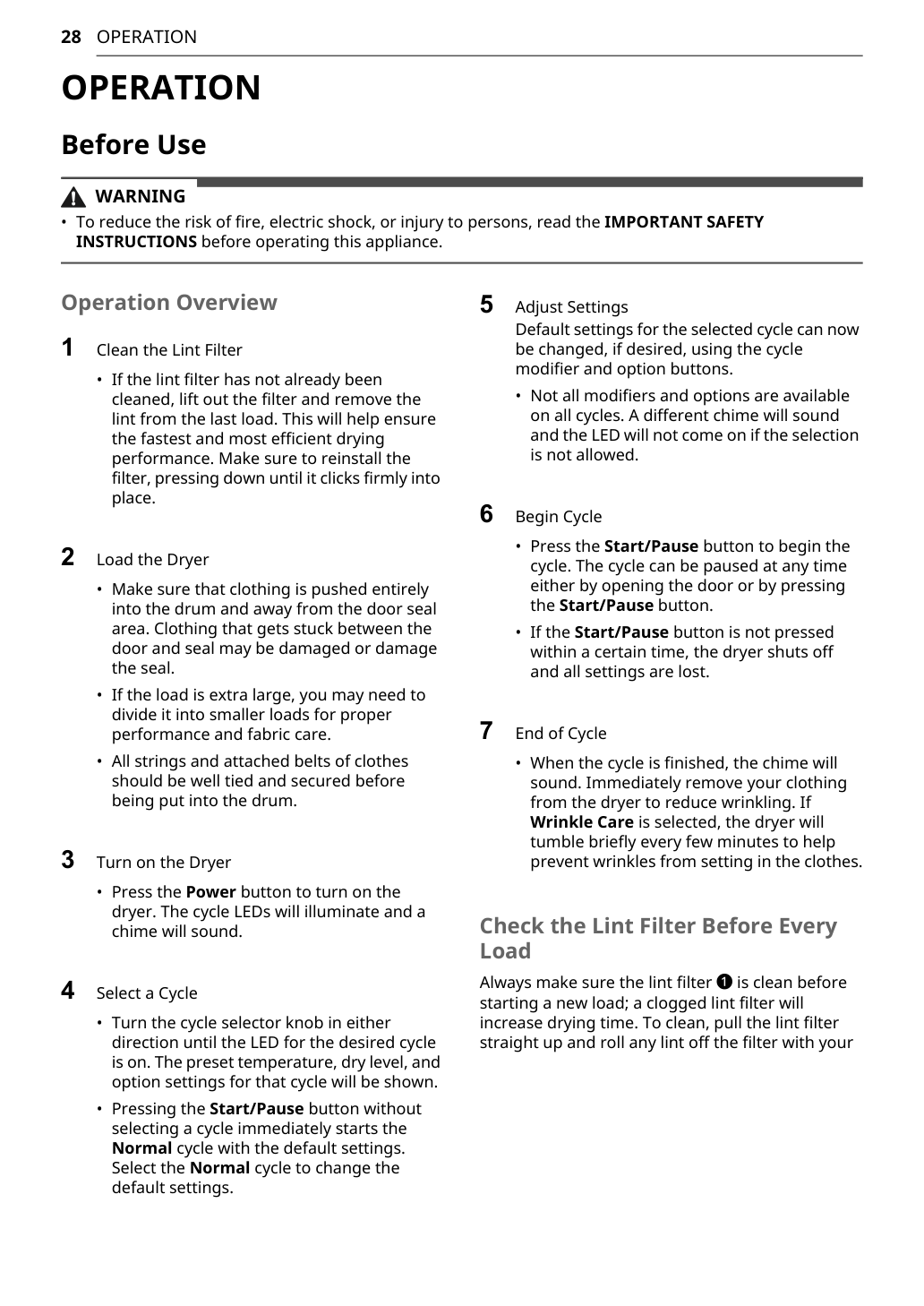
To use an LG dryer correctly, start by checking the drum. Remove any foreign objects before loading clothes. Then clean the lint filter and make sure it is installed securely.
Load clothes loosely into the drum. Do not overload the dryer. Clothes need room to tumble so warm air can circulate through the fabric. If the drum is packed too tightly, clothes may come out damp, wrinkled, or unevenly dried.
After loading the dryer, close the door, press Power, select a drying cycle, adjust settings if needed, and press Start/Pause. If you are drying everyday mixed laundry, the Normal cycle is usually a good starting point. For towels, bedding, heavy cotton, delicate fabrics, or small loads, choose a more specific cycle.
According to the manual’s operation overview, the basic process is: clean the lint filter, load the dryer, turn on the dryer, select a cycle, adjust settings, begin the cycle, and remove clothes when the cycle ends.
LG Dryer Cycle Guide
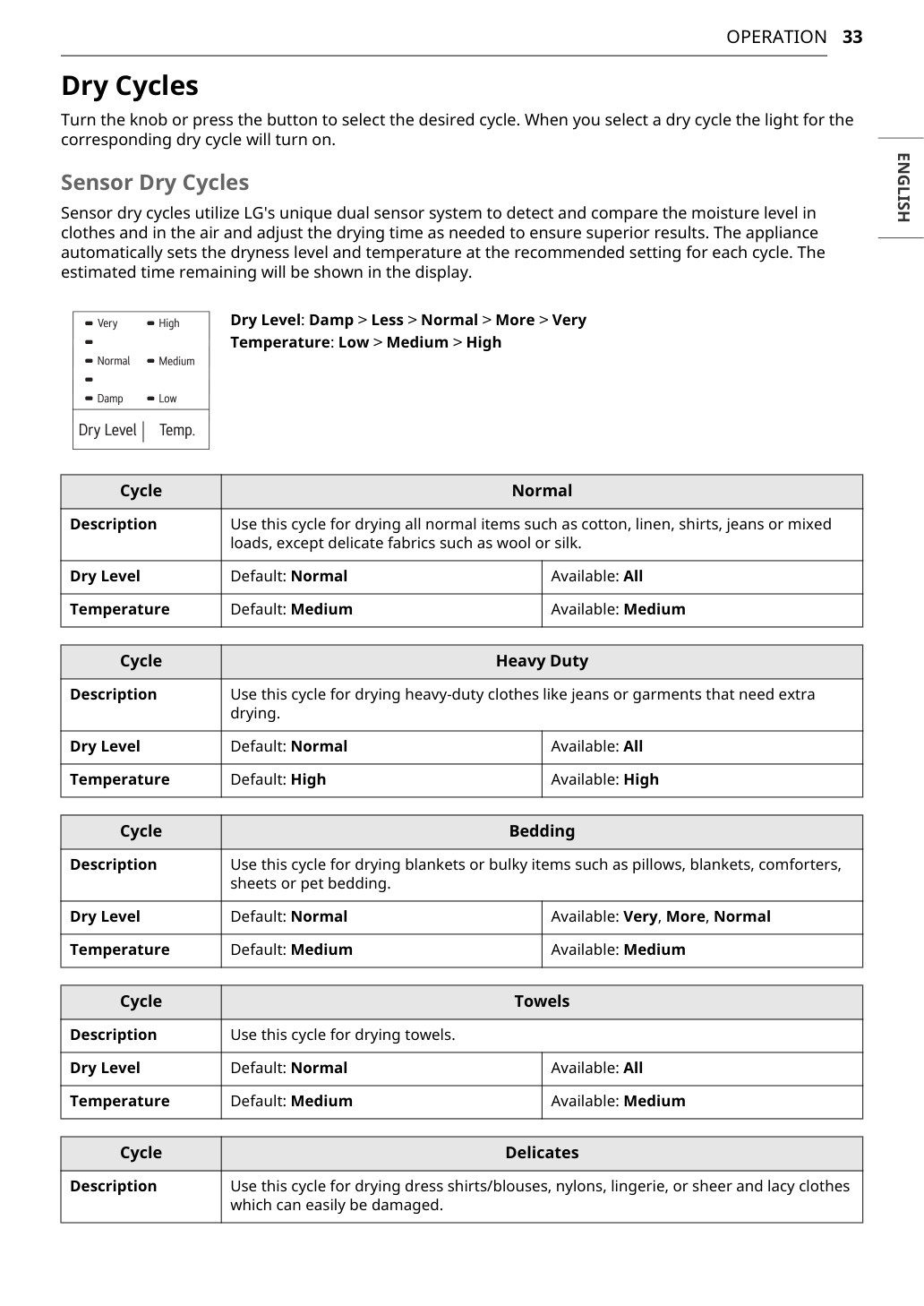
LG dryers use both Sensor Dry and Manual Dry cycles. Sensor Dry cycles detect moisture and adjust drying time automatically. Manual Dry cycles let you choose a fixed drying time, which is useful for small loads, touch-ups, or items that do not work well with automatic sensing.
| Cycle / Setting | Best For | Practical Tip |
|---|---|---|
| Normal | Everyday mixed laundry | Good default cycle for regular clothes. |
| Heavy Duty | Jeans, work clothes, thick cotton | Use for durable fabrics that hold more moisture. |
| Towels | Bath towels and heavy cotton towels | Avoid mixing with thin shirts. |
| Bedding | Sheets, blankets, bulky items, pet bedding | Pause and rearrange if items roll into a ball. |
| Delicates | Lightweight or delicate fabrics | Use lower heat when possible. |
| Speed Dry | Small loads | Good for drying a few items quickly. |
| Air Dry | No-heat tumbling | Use for items that should not be heated. |
| Steam Cycle | Wrinkle reduction or refreshing, on steam models | Check fabric care labels first. |
The manual explains that Sensor Dry cycles use LG’s dual sensor system to detect moisture in clothes and in the air, then adjust drying time as needed. It also lists Normal, Heavy Duty, Bedding, Towels, and Delicates as common Sensor Dry cycles.
How to Reset LG Dryer
A basic reset can help if the control panel is frozen, the dryer will not start, or the appliance behaves strangely after a power interruption.
To reset an LG dryer:
- Press Power to turn the dryer off.
- Unplug the dryer from the outlet.
- Wait 1–5 minutes.
- Plug the dryer back in.
- Press Power again.
- Select a cycle and press Start/Pause.
For an electric dryer, also check the circuit breaker. If the dryer will not turn on or does not heat, the cause may be a blown fuse, tripped circuit breaker, or power outage. LG’s troubleshooting section recommends resetting the breaker or replacing the fuse, but not increasing fuse capacity.
How to Reset LG Dryer Without Removing Back Panel
Many users search for how to reset LG dryer without removing back panel. In most normal cases, you do not need to remove the back panel to reset an LG dryer. A basic reset is done by disconnecting power or resetting the home circuit breaker.
Do not remove panels unless the manual specifically instructs you to do so for user maintenance. LG warns users not to disassemble or repair the appliance themselves unless specifically recommended in the owner’s manual. The manual also says the appliance should be disconnected from power before cleaning or maintenance.
How to Reset LG Dryer Not Heating
If your LG dryer runs but does not heat, a reset may help only if the problem is caused by a temporary control issue or power interruption. If the dryer still does not heat after a reset, check the power supply, gas supply, Energy Saver setting, lint filter, and dryer vent.
For an electric LG dryer, check the circuit breaker carefully. Electric dryers commonly use a 240V circuit, which may be controlled by two breaker switches. Sometimes only one side trips. In that case, the dryer may still turn and tumble, but it may not heat properly. Reset both breaker switches fully by turning them off and then back on.
For a gas LG dryer, make sure the gas supply is open. If gas supply or service is turned off, the dryer may still run without producing heat. Confirm that the dryer shutoff valve and the home gas supply are fully open.
Also check Energy Saver. On some LG dryers, the Energy Saver option may be selected by default on the Normal cycle. This option reduces energy use by adding an air-dry section at the beginning of the cycle. That means it can feel like the dryer is not heating at first, even though the appliance is working normally. The manual says Energy Saver begins with an air dry section and increases drying time when selected.
How to Clean LG Dryer Filter
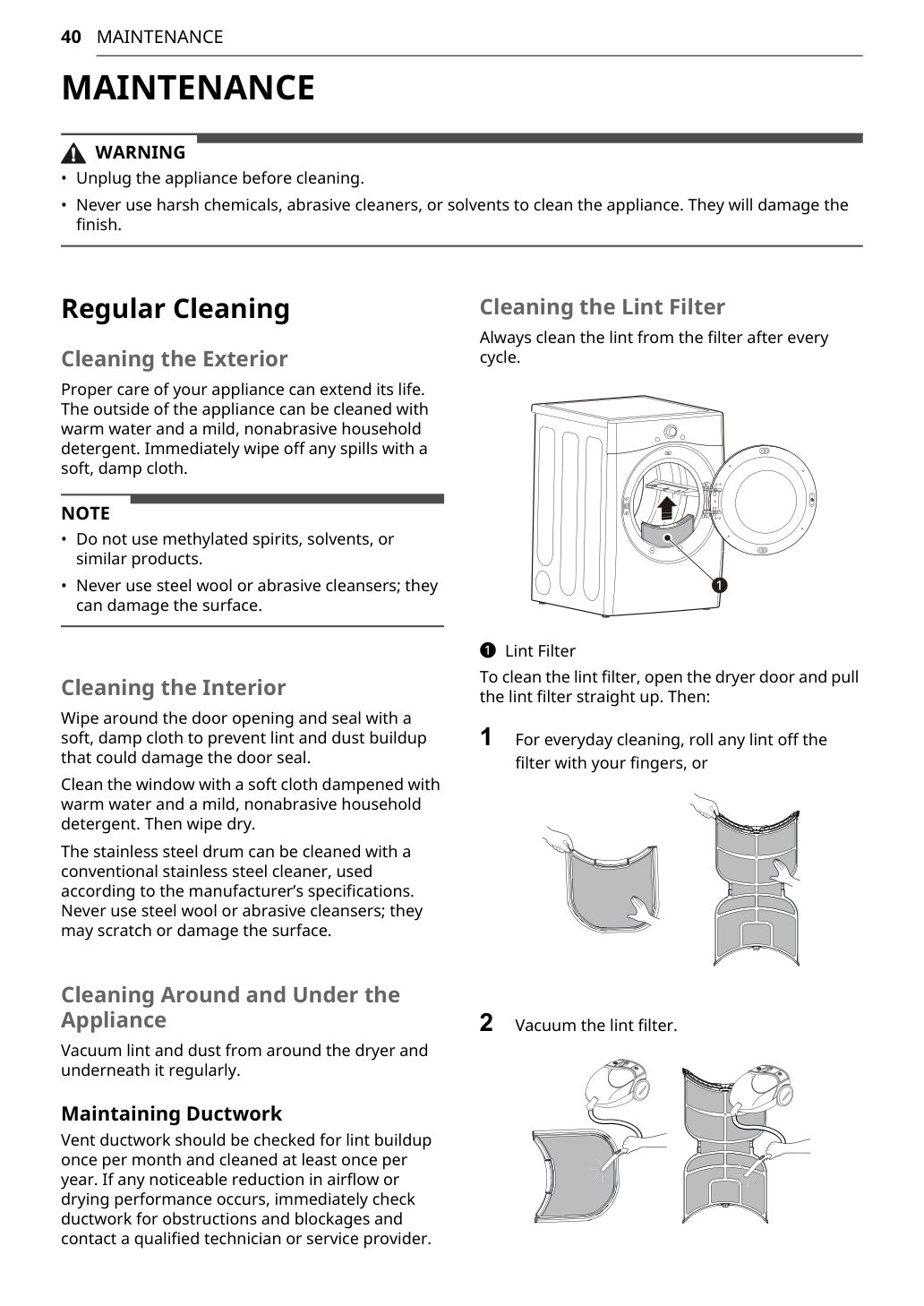
To clean the LG dryer filter, open the door and pull the lint filter straight up. Remove lint from the screen with your fingers or vacuum the filter. Then reinstall the filter securely before starting another cycle.
Clean the lint filter after every cycle. This is especially important after drying towels, blankets, fleece, pet bedding, or new cotton items. These loads can produce more lint than normal clothing.
A clogged lint filter can reduce airflow, increase drying time, and make the dryer work harder. LG’s maintenance section says to always clean lint from the filter after every cycle.
How to Clean an LG Dryer
When people search how to clean a LG dryer or how to clean an LG dryer, they usually need more than lint filter cleaning. A complete dryer cleaning routine should include the lint filter, drum, door opening, door seal, exterior, area around the dryer, and exhaust duct.
Before cleaning, unplug the dryer. Wipe the exterior with warm water and a mild, nonabrasive household detergent. Avoid harsh chemicals, abrasive cleaners, solvents, steel wool, or anything that can damage the finish.
Wipe around the door opening and seal with a soft, damp cloth to prevent lint and dust buildup. Vacuum lint and dust from around and under the appliance regularly. Keep the laundry area clean and free from lint, paper, rags, gasoline, chemicals, and other flammable materials.
How to Clean LG Dryer Vent
If your dryer takes too long to dry or shows Flow Sense or d80, the vent system should be checked. The vent system includes the duct behind the dryer, the duct inside the wall, and the outside exhaust hood.
To clean an LG dryer vent:
- Turn off and unplug the dryer.
- Carefully pull the dryer away from the wall.
- Check whether the vent hose is crushed, kinked, or disconnected.
- Remove lint from the transition duct.
- Check the wall duct for lint buildup.
- Inspect the outside vent hood.
- Make sure the outside damper opens freely.
- Reconnect the duct without crushing it.
LG recommends 4-inch metal ductwork and says the exhaust duct should be kept as short as possible. The manual also recommends using as few elbows as possible, securing duct joints with duct tape, and making sure the ductwork is not crushed or restricted.
LG also states that vent ductwork should be checked for lint buildup once per month and cleaned at least once per year. If airflow or drying performance is noticeably reduced, the ductwork should be checked immediately.
LG Dryer d80: How to Clean and Clear the Code
Think of d80 as a warning sign. Your dryer is telling you: “Air is not moving out fast enough.”
To clear d80 on an LG dryer, start with the airflow path:
- Clean the lint filter.
- Check the vent hose behind the dryer.
- Make sure the hose is not crushed or kinked.
- Clean lint from the duct.
- Check the outside wall vent.
- Make sure the outside damper opens freely.
- Run another drying cycle and see if the warning returns.
Do not simply reset the dryer and ignore d80. If the exhaust system is still blocked, the warning may return, drying time may increase, and the appliance may not perform properly.
How to Fix Flow Sense on LG Dryer
Flow Sense is LG’s duct blockage sensing system. It detects restrictions in the ductwork that reduce exhaust flow from the dryer. According to the manual, the appliance uses Flow Sense to detect blockages and restrictions in dryer ductwork. Keeping ductwork clean helps clothes dry faster and reduces energy use.
To fix Flow Sense on an LG dryer:
- Clean the lint filter.
- Inspect the duct behind the dryer.
- Remove lint from the vent hose.
- Check the outside exhaust hood.
- Make sure the duct is not crushed.
- Reduce sharp bends if possible.
- Avoid long vent runs with too many elbows.
Do not treat “how to turn off Flow Sense on LG dryer” as the real solution. Flow Sense is a warning. The better solution is to remove the airflow restriction.
How to Take Apart or Disassemble an LG Dryer
Keywords like how to disassemble LG dryer, how to take apart LG dryer, how to open LG dryer, and how to take apart LG dryer to clean lint have search volume, but this topic should be handled carefully.
For normal cleaning, focus on safe user-accessible areas first: the lint filter, filter opening, drum, door seal, vent hose, and outside exhaust hood. Do not attempt internal disassembly unless you are qualified or the manual gives specific user instructions.
LG’s safety section says not to disassemble or repair the appliance yourself and that repairs should be performed by qualified service personnel unless specifically recommended in the owner’s manual.
If you smell burning, hear unusual noises, see repeated error codes, or suspect lint is trapped deep inside the cabinet, contact qualified service instead of taking apart the dryer yourself.
How to Turn Off Sound on LG Dryer Front Loader
Some LG dryers allow you to adjust or turn off signal sounds from the control panel. Look for a Signal button or a sound icon. The exact button combination may vary by model.
On this manual’s control layout, the Signal function is controlled by pressing and holding the Dry Level button for 3 seconds. The manual says this turns the melody and button tones on or off.
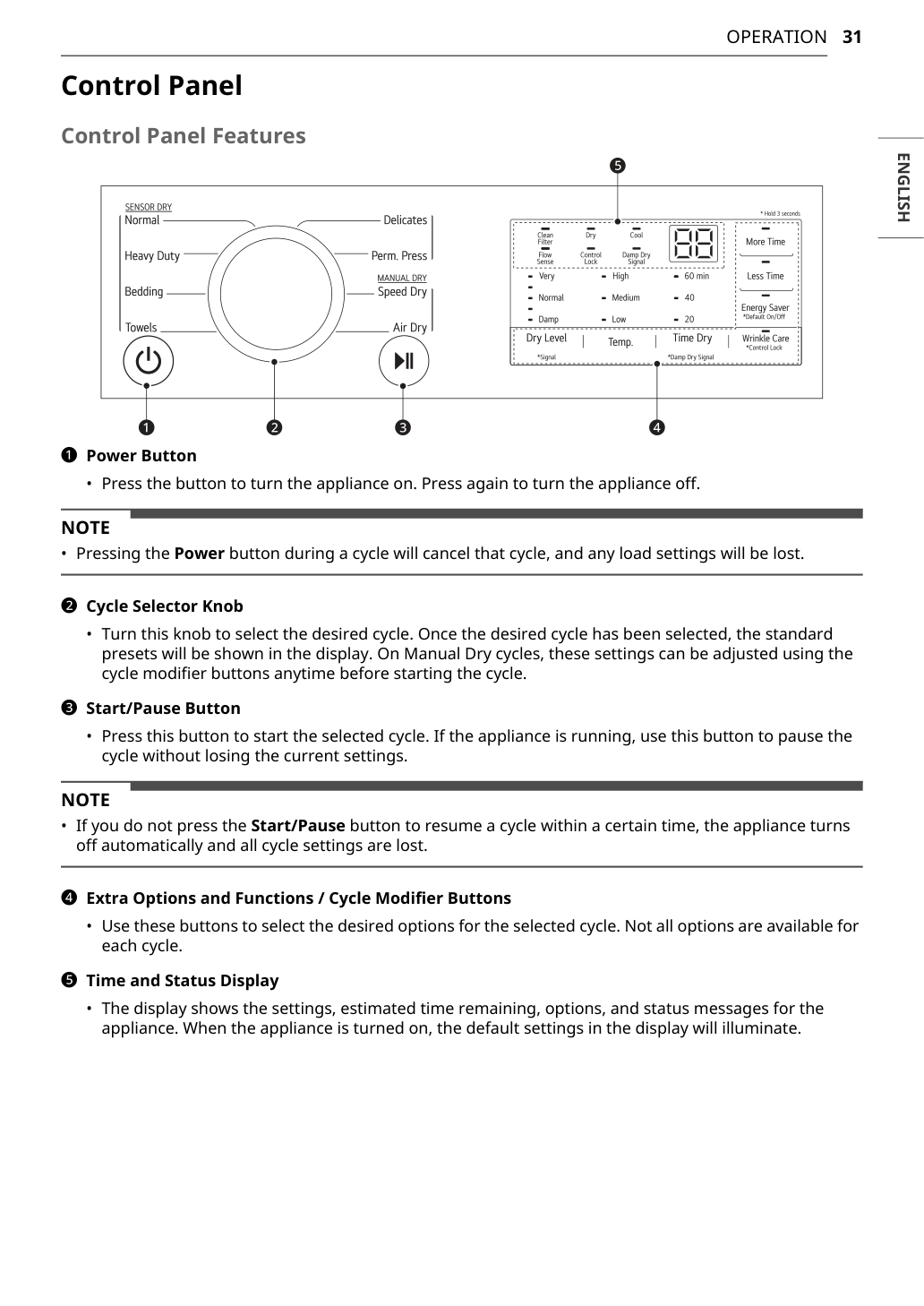
How to Turn Off Energy Saver on LG Dryer
Energy Saver can make it seem like the dryer is not heating at the beginning of the Normal cycle. The manual explains that this option may add an air-dry section at the beginning of the cycle. If you want faster drying or stronger heat from the start, deselect Energy Saver when available.
This is especially useful when drying towels, jeans, bedding, or heavy cotton loads. If you are troubleshooting how to reset LG dryer not heating, always check Energy Saver before assuming the heating system is broken.
How to Turn Off Sensor Dry or Cool Setting
Sensor Dry is designed to automatically detect moisture and stop the cycle when clothes reach the selected dryness level. On many LG dryers, you cannot simply turn off Sensor Dry inside a Sensor Dry cycle. Instead, choose a Manual Dry cycle if you want direct control over time.
The Cool indicator usually means the dryer is in the cool-down stage. This is normal near the end of a cycle. It helps lower fabric temperature before unloading.
LG Steam Dryer: How to Use Steam Features
Some LG dryer models include steam functions. If your model has steam features, make sure the water inlet hose is connected properly before using steam cycles. Steam can help refresh clothes or reduce wrinkles, but it is not a replacement for washing dirty garments.
Before using steam, check the garment care label. Do not use steam on fabrics that may be damaged by heat or moisture.
How to Connect LG Dryer to WiFi and Use Smart Diagnosis
Some LG dryers support the LG ThinQ app and Smart Diagnosis. The manual explains that LG ThinQ can help diagnose issues through a smartphone. Users can launch the LG ThinQ app, select Smart Diagnosis, and follow the app instructions.
For audible Smart Diagnosis, turn on the appliance, hold the phone near the Power button, then press and hold the Temp. button for 3 seconds or longer while keeping the phone in place until the tone transmission finishes.
This feature can be useful when the dryer has repeated errors, heating problems, or unexplained performance issues.
FAQ: LG Dryer Reset, Cleaning, Flow Sense, and Heating
How do I reset my LG dryer?
To reset an LG dryer, turn it off, unplug it, wait a few minutes, plug it back in, and press Power again. For an electric dryer, also check the circuit breaker.
Can I reset an LG dryer without removing the back panel?
Yes. For a basic reset, you do not need to remove the back panel. A normal reset is done by disconnecting power or resetting the circuit breaker.
Why is my LG dryer running but not heating?
Common causes include a tripped breaker, blown fuse, incorrect power supply, gas supply being turned off, Energy Saver mode, a dirty lint filter, or a blocked dryer vent.
What does d80 mean on an LG dryer?
The d80 warning usually means the dryer has detected a major airflow restriction in the exhaust system. It is commonly related to lint buildup, a crushed vent hose, a blocked outside vent, or a long duct run.
How do I fix Flow Sense on an LG dryer?
Clean the lint filter, inspect the vent hose, remove lint from the duct, check the outside wall vent, and make sure the duct is not crushed or too long.
How often should I clean the LG dryer lint filter?
Clean the lint filter after every cycle. This helps maintain airflow and drying performance.
How often should I clean the LG dryer vent?
Check the vent ductwork for lint buildup once per month and clean it at least once per year. If drying performance drops, check the ductwork immediately.
Can I turn off Flow Sense on my LG dryer?
You should not treat turning off Flow Sense as the solution. Flow Sense warns that the exhaust system may be restricted. The better solution is to clean and inspect the venting system.
Why does my LG dryer show Cool?
The Cool indicator usually means the dryer is in the cool-down stage. This is normal near the end of a cycle and helps reduce fabric temperature before unloading.
Why does my LG dryer take too long to dry?
Common reasons include a dirty lint filter, blocked exhaust duct, overloaded drum, mixed heavy and lightweight fabrics, incorrect control settings, very small loads on Sensor Dry, or Energy Saver mode.
Final Tips
Most LG dryer problems can be reduced by using the appliance correctly. Clean the lint filter before every load, avoid overloading, choose the right drying cycle, and keep the dryer vent clear.
For reset problems, start with a simple power reset and circuit breaker check. For no-heat problems, check whether the model is gas or electric, then inspect the gas valve, circuit breaker, Energy Saver setting, lint filter, and vent system.
For d80 or Flow Sense warnings, focus on airflow before assuming the dryer is broken. A well-maintained LG dryer should dry clothes more evenly, reduce wrinkles, save energy, and avoid many common service issues.
The three most important habits are simple: clean the lint filter every time, do not overload the drum, and keep the exhaust system clear.